
TL;DR: AI agents are supposed to give people time back. If progress exists only on a screen, people still have to keep looking. This system assigns the few moments that actually need a person to different senses: the screen for reading and deciding, speech for hearing progress when you are near the computer, and phone or Apple Watch haptics for carrying state away from the desk. It was built first for Claude, then moved to Codex. Both can now say what happened when a full task is complete or a person must decide.
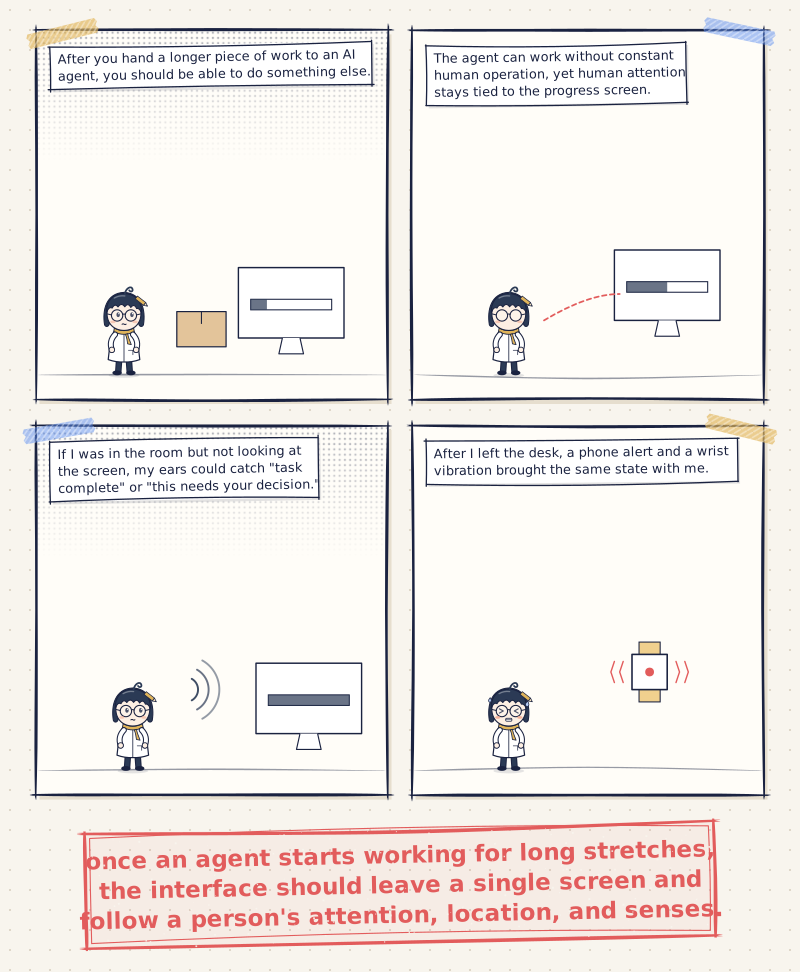
After you hand a longer piece of work to an AI agent, you should be able to do something else. In practice I often ran into another kind of attention cost: because I did not know when the task would finish, whether it was stuck, or whether it was waiting for my decision, I kept coming back to the window.
That creates a contradiction. The agent can work without constant human operation, yet human attention stays tied to the progress screen. The issue is not only whether a notification exists. It is whether the notification arrives at the right time, through the channel a person is most likely to notice in that moment.
Once speech and haptics were in place, my interaction with AI no longer stopped at vision. If I was in the room but not looking at the screen, my ears could catch “task complete” or “this needs your decision.” After I left the desk, a phone alert and a wrist vibration brought the same state with me. Only when I returned to the screen did I use vision to read the result, understand the context, and make a judgment.
I built the reporting first for Claude, then moved it to Codex. This article keeps the full implementation so people who want to set it up can do it step by step. What I most want to share, though, is an idea any AI agent user can adopt: once an agent starts working for long stretches, the interface should leave a single screen and follow a person’s attention, location, and senses.
What speech and haptics are meant to solve
The core problem for speech alerts is that a person has to look on purpose in order to know an AI agent’s work state. As long as progress depends entirely on vision, it is hard to leave the work window in any real sense.
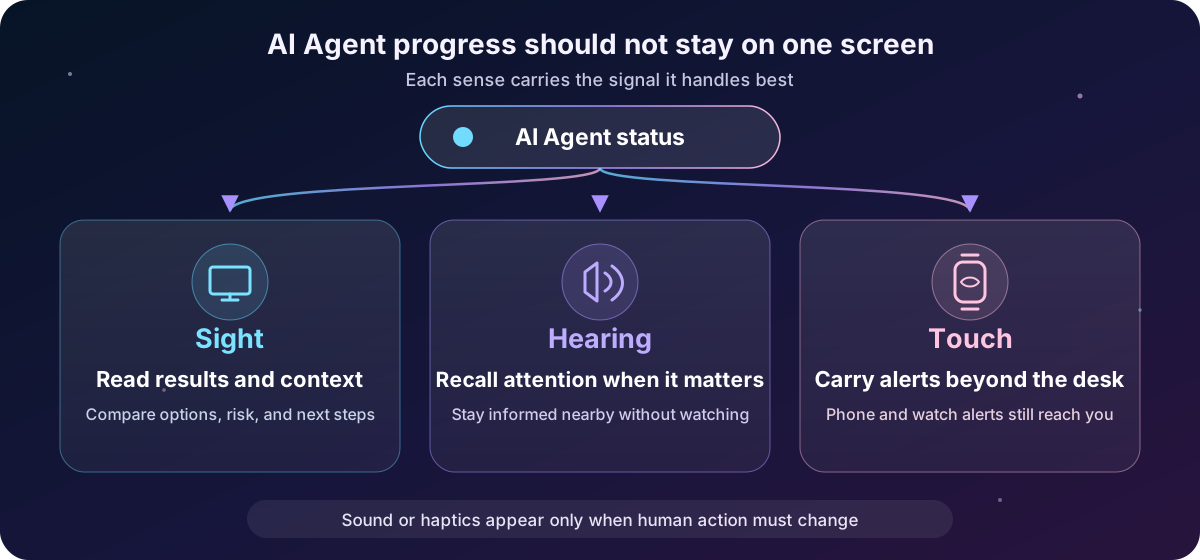
I do not want the agent to read every step out loud. Only a few alerts are actually useful: the full job is done, the work cannot continue, or the system needs a person to approve or choose. Incremental progress can stay on screen. Sound or haptics should appear only when a person’s next action needs to change.
The three senses play different roles in this kind of collaboration:
| Sensory channel | Best fit for | How it helps the user |
|---|---|---|
| Sight | Full results, context, options, and risk | Good for reading, comparing, and deciding |
| Hearing | Short signals such as task complete or a pending decision | Lets you know the state when you are nearby but not looking |
| Touch | Phone or watch vibration | Lets you notice the state after you leave the desk or when the room is noisy |
Speech and haptics cover the moments a screen cannot reach. The screen still presents the full content. Together they mean you do not have to keep watching, and you still do not miss the points that need you. The principle holds for any AI agent that runs long tasks, waits for permission, or asks for a decision along the way. Claude and Codex are simply the two cases this article actually walked through.
You do not have to be technical. You can hand the setup kit to an AI
If you are not comfortable with terminals, config files, or hooks, you do not need to understand the code that follows line by line. You can download the AI setup brief I prepared and give it to an AI that can operate this Mac, and ask it to detect, plan, and configure for your environment.
📦 Download: AI Agent Voice, Phone, and Watch Notification Setup Kit
After you upload the file, tell the AI:
Follow this file to help me set this up. Detect and plan first. Change files only after I agree. If you hit API keys, login, system permissions, or existing settings you are unsure about, stop and let me handle it myself.
The kit does not ask the AI to copy paths from my machine. It first identifies whether the user is on Claude Code, Codex, or another agent, then checks whether that version has a real event entry point. If existing settings conflict, the platform cannot reliably tell when a full task is complete, or the only fallback is something like a polling loop, the AI must stop and explain. It must not quietly start a long-running process just to make the job look finished.
The kit also writes safety boundaries into the task: the user enters Pushover credentials in person; a pending-decision alert must never press approve on anyone’s behalf; every test starts disabled and in a dry run, and only then turns on speech, phone, and watch in order. For a non-technical user, handing an AI the done conditions, stop conditions, and acceptance checks together matters more than specifying the program line by line.
This started on Claude. How did it move to Codex?
The work began on Claude. I first wired Claude Code’s Stop hook to task-done.sh, which then called notify.sh to play speech and send Pushover. task-done.sh checks an explicit task marker first. If there is no full task being tracked, it exits quietly. That condition stops every Claude reply from being announced as “task complete.”
Claude’s notification entry also keeps three states: complete, waiting for a person to decide, and failed. Completion comes in through Stop. When a workflow decides that a person must step in or the work cannot continue, it calls the same notifier in waiting or failed mode. Claude Code’s official docs define Stop as firing when a turn finishes its reply, and they also provide events such as PermissionRequest. The hook receives JSON context for the event. The real system still has to add its own “full task” check. Seeing Stop is not enough to declare delivery complete. See the Claude Code Hooks reference.
When Codex later entered the work environment, I did not invent a new kind of alert. I moved the same notification contract:
- On completion, say which AI finished what.
- When a decision is needed, say which AI needs what decided.
- The Mac plays speech, and Pushover sends the same state to iPhone and Apple Watch.
- The same event is emitted at most once, and the system can be turned off immediately.
Moving the contract is not the same as copying the hook. Claude and Codex differ in event names, input data, and how completion is judged, so each side keeps its own platform adapter. The adapter’s only job is to turn a raw event into a consistent complete, pending-decision, or failed state. The one-shot lock, content redaction, speech, and cross-device output follow the same design. The result is not “Codex now has its own separate alerts.” It is that Claude and Codex both connect to the same perceptible layer of work progress.
Define two events first. Do not call every stop a completion
Claude and Codex have different underlying events. I still split the main notifications into two kinds:
| Event | What a person needs to do | Notification rule |
|---|---|---|
| Decision needed | Return to Claude or Codex to approve, deny, or answer | Notify immediately, but only once for the same request |
| Task complete | Review the final result and decide what is next | Notify only for the final reply of a full task |
The distinction looks simple. In practice it is the core of the system.
Codex’s official advanced settings provide notify, which currently supports agent-turn-complete. The event JSON includes fields such as thread-id, turn-id, the working directory, the user message, and the last assistant message. The official language is that one agent turn has ended, not that the full job a user handed over is complete. Those two are not the same. See Codex Advanced Configuration.
Tool steps, incremental output, or other work windows can all cause the notification entry point to be called. A completion alert must first confirm that the latest message is truly phase=final in the main work window, and only then enter the one-shot lock.
Decision requests have a more precise entry point. Codex hooks run PermissionRequest when the system needs approval, which makes it a good way to call a person back to the computer. It should not auto-approve on anyone’s behalf. The notification script only asks the person to return. Judgment stays on the Codex screen. For setup location and trust, see the Codex Hooks documentation.
Architecture: take the alert off the screen, without taking judgment away from the person
The overall architecture looks like this. What the two platforms share is notification semantics and output rules, not the same event configuration:
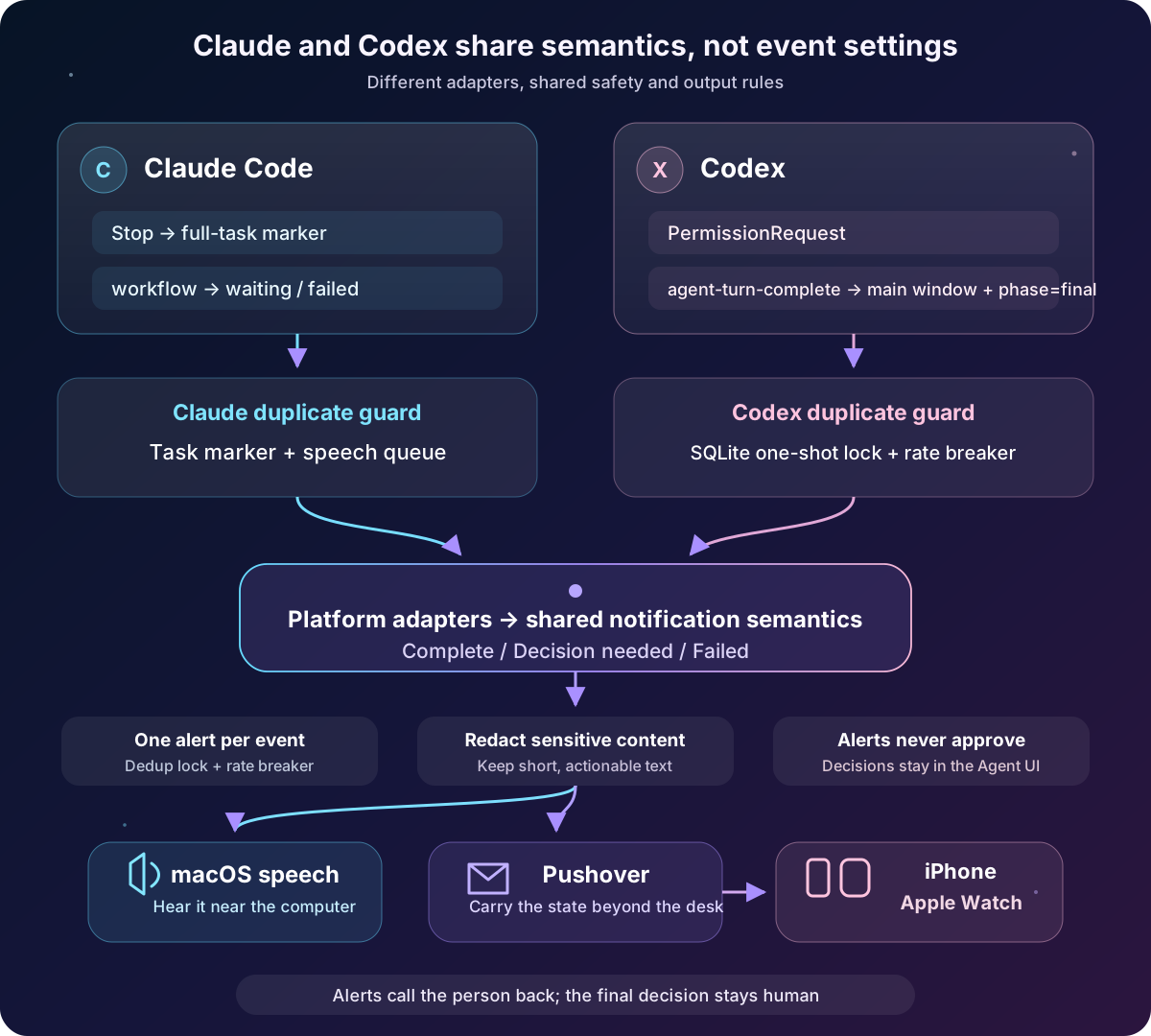
It has five safety rules:
- With no explicit enable file, nothing runs.
- Claude completion alerts require an explicit task marker. Codex completion alerts accept only
phase=finalfrom the main work window. - Claude’s task marker is consumed once. A stable Codex event must first obtain a one-shot SQLite primary key.
- Codex uses a rate circuit breaker to limit short bursts of events. Claude uses a speech queue so multiple windows do not talk over each other.
- Pushover does not use emergency priority, and the program does not retry.
The fifth point matters in particular. Pushover’s Message API defines priority=2 as an emergency alert that repeats until the user acknowledges it. That is for real emergencies, not ordinary AI work progress. This article uses normal priority 0.
Prepare Pushover, iPhone, and Apple Watch
You need:
- A Mac, plus Claude Code, Codex, or both, able to run local hooks.
- Python 3. The scripts in this article use only the Python standard library.
- A Pushover account and the Pushover app installed on iPhone.
- Your Pushover User Key, and an API Token from an Application you create.
- Apple Watch (optional).
First confirm the platform versions you are using:
claude --version
codex --version
Then create your own Application in Pushover. Store the User Key and API Token locally. Do not put them in a Git repository:
mkdir -p "$HOME/.codex/hooks" "$HOME/.codex/notification-state"
chmod 700 "$HOME/.codex/hooks" "$HOME/.codex/notification-state"

cat > "$HOME/.codex/pushover.env" <<'EOF'
PUSHOVER_TOKEN='replace with your Application API Token'
PUSHOVER_USER='replace with your User Key'
EOF

chmod 600 "$HOME/.codex/pushover.env"
The paths above follow this article’s Codex example. If Claude and Codex should read the same Pushover credentials, put them in ~/.config/ai-notify/pushover.env instead and point both notifiers at that file. The important part is mode 600, and not committing the file to version control.
This is a one-time setup command in a tutorial. In real use, make sure terminal history, screen recordings, or shared screens do not expose the keys. Do not paste this file’s contents to an AI.
Next, allow notifications in iPhone Settings → Notifications → Pushover. Apple Watch can mirror iPhone app notification settings by default. You can also open the Watch app on iPhone, go to Notifications, and adjust Pushover. Apple’s notes are in Change notification settings on Apple Watch.
One caveat: a successful Pushover API response only means the server accepted the message. Whether the watch vibrates still depends on notification permissions, Focus, silent mode, whether the watch is worn and unlocked, and the state of iPhone and Apple Watch at that moment.
Connect Claude first: use an explicit task marker so every Stop is not treated as done
Claude Code can set hooks in the user-level ~/.claude/settings.json. The following wires Stop to a completion-check script:
{
  "hooks": {
    "Stop": [
      {
        "matcher": "",
        "hooks": [
          {
            "type": "command",
            "command": "/Users/yourname/.claude/hooks/task-done.sh"
          }
        ]
      }
    ]
  }
}
Do not wire Stop directly to a “task complete” voice line. The official definition is that Claude finished one reply. It does not guarantee that the full job you assigned is done. My current approach is to create ~/.claude/last-task.txt when work starts. Only if that file exists does task-done.sh alert and then remove the marker:
#!/bin/bash
set -u

TASK_FILE="$HOME/.claude/last-task.txt"
[ -s "$TASK_FILE" ] || exit 0

TASK_TITLE="$(head -n 1 "$TASK_FILE")"
rm -f "$TASK_FILE"
exec "$HOME/.claude/hooks/notify.sh" "$TASK_TITLE" done
When a full job that needs tracking begins, the workflow writes a short, non-secret title into the marker file. After Claude finishes normally and Stop fires, the marker is consumed only once. Ordinary Q&A has no marker, so the script stays quiet.
notify.sh is Claude’s platform notification entry. I currently let it accept three modes:
"$HOME/.claude/hooks/notify.sh" "what finished" done
"$HOME/.claude/hooks/notify.sh" "what needs a decision" waiting
"$HOME/.claude/hooks/notify.sh" "where it got stuck" failed
done enters through the Stop flow above. waiting and failed are called by a Claude workflow when it is sure a person must step in or the work cannot continue. If you want Claude’s PermissionRequest wired automatically as well, write a separate event adapter. Parse tool_name and tool_input from standard input, redact paths, keys, and raw commands, then hand the result to the notifier. Do not write an approve or deny result back through the hook. The notification’s job is to find a person. The decision still belongs to the person.
A public tutorial can use macOS built-in say. My actual version tries a personal voice first and falls back to Meijia if that fails. Whichever voice you use, notify.sh should have a one-shot lock or a speech queue so multiple Claude windows do not play at once. Pushover keys stay in the local file from the previous section. They do not go into the script or the repository.
Then connect Codex: a notifier that runs only once
Codex continues the notification semantics already built for Claude, but it needs its own event adapter. A complete production version has to handle event parsing, content summaries, sensitive-data redaction, main-window checks, SQLite concurrency locks, a circuit breaker, Pushover, and speech. Completion alerts summarize last-assistant-message. Decision alerts prefer tool_input.description; if there is no description, they report only the tool type and never send the raw command. The following is a core structure you can assemble into ~/.codex/hooks/codex_notify.py:
#!/usr/bin/env python3
import hashlib, json, os, re, shlex, sqlite3, subprocess, sys, time
import urllib.parse, urllib.request
from pathlib import Path

HOME = Path.home()
STATE = HOME / ".codex/notification-state"
ENABLED = HOME / ".codex/notifications.enabled"
SESSIONS = HOME / ".codex/sessions"
ENV_FILE = HOME / ".codex/pushover.env"

MESSAGES = {
    "completion": "Codex task complete",
    "permission": "Codex needs your decision",
}

def h(text):
    return hashlib.sha256(text.encode()).hexdigest()[:32]

def read_event(mode, argv_json=None):
    raw = argv_json if mode == "completion" else sys.stdin.read()
    try:
        event = json.loads((raw or "{}").strip())
        return event if isinstance(event, dict) else {"value": event}
    except json.JSONDecodeError:
        return {"unparsed": raw}

def safe_text(value, limit=120):
    if not isinstance(value, str):
        return ""
    fence = re.escape("`" * 3)
    text = re.sub(f"{fence}.*?{fence}", " ", value, flags=re.S)
    text = re.sub(r"https?://\S+", "[link]", text)
    text = re.sub(r"(?i)Bearer\s+\S+", "Bearer [redacted]", text)
    text = re.sub(
        r"(?i)\b(api[_-]?key|token|password|secret)\b\s*[:=]\s*\S+",
        r"\1=[redacted]",
        text,
    )
    text = re.sub(r"/(?:Users|home)/\S+", "[local path]", text)
    text = re.sub(r"\s+", " ", text).strip()
    return text if len(text) <= limit else text[:limit - 1].rstrip() + "…"

def event_detail(mode, event):
    if mode == "completion":
        raw = event.get("last-assistant-message", "")
        first = re.split(r"\n\s*\n", raw)[0] if isinstance(raw, str) else ""
        return safe_text(first) or "This assignment has produced a final result"
    tool = str(event.get("tool_name") or "")
    tool_input = event.get("tool_input")
    if isinstance(tool_input, dict):
        for key in ("description", "justification", "reason"):
            detail = safe_text(tool_input.get(key))
            if detail:
                return detail
    if tool.lower() in {"bash", "shell", "exec_command"}:
        return "Allow this terminal command?"
    if tool.lower() in {"apply_patch", "edit", "write"}:
        return "Allow this file change?"
    return "Return to Codex to review the pending action"

def final_gate(event):
    """Version-dependent: accept only the latest phase=final from the main window."""
    thread_id = event.get("thread-id") or event.get("thread_id")
    if not thread_id:
        return False, None
    files = list(SESSIONS.rglob(f"*{thread_id}.jsonl"))
    if not files:
        return False, None
    path = max(files, key=lambda p: p.stat().st_mtime_ns)
    lines = path.read_text(errors="replace").splitlines()
    if not lines:
        return False, None
    try:
        meta = json.loads(lines[0]).get("payload", {})
    except json.JSONDecodeError:
        return False, None
    if meta.get("thread_source") == "subagent" or "subagent" in str(meta.get("source", {})):
        return False, None

    latest_activity_turn = None
    latest_assistant = None
    for line in reversed(lines[-10000:]):
        try:
            record = json.loads(line)
        except json.JSONDecodeError:
            continue
        if record.get("type") != "response_item":
            continue
        payload = record.get("payload", {})
        md = payload.get("internal_chat_message_metadata_passthrough", {})
        item_turn = md.get("turn_id") if isinstance(md, dict) else None
        latest_activity_turn = latest_activity_turn or item_turn
        if latest_assistant is None and payload.get("type") == "message" and payload.get("role") == "assistant":
            latest_assistant = (payload.get("phase"), item_turn)
        if latest_activity_turn and latest_assistant:
            break
    if not latest_assistant:
        return False, None
    phase, assistant_turn = latest_assistant
    allowed = phase == "final" and assistant_turn == latest_activity_turn and bool(assistant_turn)
    return allowed, assistant_turn

def db():
    STATE.mkdir(mode=0o700, parents=True, exist_ok=True)
    conn = sqlite3.connect(STATE / "events.sqlite3", isolation_level=None)
    conn.execute("PRAGMA busy_timeout=5000")
    conn.execute("CREATE TABLE IF NOT EXISTS events (event_key TEXT PRIMARY KEY, mode TEXT, created_at INTEGER)")
    return conn

def claim_once(mode, key):
    conn = db()
    now = int(time.time())
    conn.execute("BEGIN IMMEDIATE")
    try:
        if conn.execute("SELECT 1 FROM events WHERE event_key=?", (key,)).fetchone():
            conn.execute("COMMIT")
            return False
        # Simple circuit breaker: at most 3 events of the same type in 10 minutes.
        count = conn.execute(
            "SELECT COUNT(*) FROM events WHERE mode=? AND created_at>=?", (mode, now - 600)
        ).fetchone()[0]
        if count >= 3:
            conn.execute("COMMIT")
            return False
        conn.execute("INSERT INTO events VALUES (?, ?, ?)", (key, mode, now))
        conn.execute("COMMIT")
        return True
    except Exception:
        conn.execute("ROLLBACK")
        raise
    finally:
        conn.close()

def credentials():
    result = {}
    if not ENV_FILE.is_file():
        return result
    for raw in ENV_FILE.read_text().splitlines():
        if "=" not in raw or raw.lstrip().startswith("#"):
            continue
        key, value = raw.split("=", 1)
        if key in {"PUSHOVER_TOKEN", "PUSHOVER_USER"}:
            parsed = shlex.split(value.strip())
            result[key] = parsed[0] if parsed else ""
    return result

def push(message):
    c = credentials()
    if not c.get("PUSHOVER_TOKEN") or not c.get("PUSHOVER_USER"):
        return
    body = urllib.parse.urlencode({
        "token": c["PUSHOVER_TOKEN"],
        "user": c["PUSHOVER_USER"],
        "title": "Codex",
        "message": message,
        "priority": "0",
        "sound": "pushover",
    }).encode()
    req = urllib.request.Request(
        "https://api.pushover.net/1/messages.json", data=body, method="POST"
    )
    try:
        urllib.request.urlopen(req, timeout=6).read(4096)
    except Exception:
        pass  # Deliberately no retry. A local log can be added for troubleshooting.

def main():
    mode = sys.argv[1]
    event = read_event(mode, sys.argv[2] if len(sys.argv) > 2 else None)
    if not ENABLED.is_file():
        return
    task_turn = event.get("turn-id") or event.get("turn_id")
    if mode == "completion":
        allowed, task_turn = final_gate(event)
        if not allowed:
            return
    canonical = json.dumps(event, sort_keys=True, ensure_ascii=False)
    thread = event.get("thread-id") or event.get("thread_id")
    if mode == "permission":
        session = event.get("session_id") or thread or "unknown"
        tool = event.get("tool_name") or "tool-unknown"
        tool_input = json.dumps(event.get("tool_input"), sort_keys=True, ensure_ascii=False)
        identity = f"{session}:{task_turn}:{tool}:{h(tool_input)}"
    else:
        identity = f"{thread}:{task_turn}" if thread and task_turn else canonical
    key = f"{mode}:{h(identity)}"
    if not claim_once(mode, key):
        return
    message = f"{MESSAGES[mode]}. {event_detail(mode, event)}"
    push(message)
    subprocess.run(["/usr/bin/say", "-v", "Meijia", message], timeout=15, check=False)

if __name__ == "__main__":
    main()
After saving:
chmod 700 "$HOME/.codex/hooks/codex_notify.py"
touch "$HOME/.codex/notifications.enabled"
chmod 600 "$HOME/.codex/notifications.enabled"
If you want different wording, change only the two sentences in MESSAGES. event_detail() fills in what finished or what needs a decision. Keep the sensitive-data redaction and length limit. Do not casually delete the event checks or deduplication logic.
Why SQLite instead of a temporary text file?
A text file can record “I have already seen this ID,” but when two work windows arrive at almost the same time, both may decide they were first before either writes. SQLite’s BEGIN IMMEDIATE and a unique primary key put the check and the claim in one atomic transaction. Only the process that gets the key sends a notification.
Beyond the one-shot lock, the upstream system may create different IDs for different stages. To SQLite those all look like new events, so a second layer is needed: a circuit breaker that limits how many events of the same type can fire in a short window. In production I set separate caps for completion and decision alerts, so a hook-behavior change still has a hard boundary.
Wire Codex completion alerts and decision alerts
Completion alerts are started by notify in ~/.codex/config.toml. First look up your absolute home directory:
echo "$HOME"If the result is /Users/yourname, set:
notify = ["/Users/yourname/.codex/hooks/agent-turn-complete.sh"]If notify already exists, do not overwrite it. Here Codex takes one external program command, not a list of listeners you can append at will. The new script has to be chained from the existing entry point.
agent-turn-complete.sh:
#!/bin/bash
set -u
EVENT_JSON="${1-}"
if [ -z "$EVENT_JSON" ]; then
  EVENT_JSON="{}"
fi
exec /usr/bin/python3 "$HOME/.codex/hooks/codex_notify.py" completion "$EVENT_JSON"
chmod 700 "$HOME/.codex/hooks/agent-turn-complete.sh"Decision alerts go in ~/.codex/hooks.json:
{
  "description": "Mac speech and Pushover alert when Codex needs approval.",
  "hooks": {
    "PermissionRequest": [
      {
        "matcher": "*",
        "hooks": [
          {
            "type": "command",
            "command": "/Users/yourname/.codex/hooks/permission-request.sh",
            "timeout": 30,
            "statusMessage": "Sending approval alert"
          }
        ]
      }
    ]
  }
}permission-request.sh:
#!/bin/bash
set -u
exec /usr/bin/python3 "$HOME/.codex/hooks/codex_notify.py" permission
chmod 700 "$HOME/.codex/hooks/permission-request.sh"This hook does not output an approve or deny decision. It only alerts. Codex still stays on the original approval screen and waits for a person.
After changing hooks, reopen Codex and use /hooks to check load and trust state. The official docs note that hook-setting changes may need review again. Do not assume a hook is live just because the file exists.
Do not test speech, phone, and watch all at once
The safest test order is to open one layer at a time:
- Leave the Claude and Codex notification switches off, and confirm that every event stays silent.
- Let the scripts write a local log only. Play no sound and call no Pushover.
- Run the same fake event twice and confirm that only the first run gets the SQLite lock.
- Turn on Mac speech by itself and confirm it speaks only once.
- Only then send one normal-priority Pushover and confirm iPhone and Apple Watch behavior.
Production scripts can add cross-platform environment variables such as AI_NOTIFY_DRY_RUN=1, AI_NOTIFY_NO_SOUND=1, and AI_NOTIFY_NO_PUSH=1. During testing, lift them one by one. Do not open every output at once.
Do not reuse the same production sentence for repeated tests. Test messages should say TEST clearly, so a person looking at a phone does not mistake a test for a real task state.
Three design decisions to get right from the start
Each hook starts one short-lived process
When an event arrives, the Claude or Codex hook starts the notifier once, finishes Pushover and speech, and exits. There is no daemon, no launchd cycle, and no automatic retry when the network fails.
That choice keeps events and notifications one to one. If Pushover is temporarily unreachable, a local log can keep the failure, but the notifier does not invent a second send on its own.
Decide that the full task is complete, then claim the one-shot lock
The SQLite key cannot depend on turn-id alone. One full job can produce different turn IDs while it runs tools, reports incremental progress, and produces a final answer. A completion alert should check three things first:
- The event comes from the main work window, not a subagent or other background work.
- The latest assistant message phase is
final, notcommentary. - This final belongs to the current latest activity, not a leftover record from a previous task.
Only after all three pass should you build a stable key from the main window ID plus the final task turn ID. Decision alerts use session, turn, tool name, and a digest of the tool input as the event key, so the same request is claimed only once.
Every output has a single owner
Completion alerts and decision alerts on the same platform can share one program, but each event can have only one entry point. Claude and Codex can each keep an event adapter. Before speech or Pushover, it must be clear which platform owns this event. Do not let a new hook call another existing notifier, and do not let two background tools handle the same event.
When an existing notify is already used by another tool, chain from that original entry point. Do not create a second, invisible parallel path. A notification system, like any other automation, needs a clear trigger, event key, output, and disable switch.
Completion checks on Claude and Codex both have version boundaries
Claude Code’s Stop and PermissionRequest, and Codex’s PermissionRequest, are hook events the platforms provide. Codex agent-turn-complete is also the official event for notify. Those names do not mean the two platforms share the same payload, timing, or completion semantics.
On the Claude side, an explicit task marker stops every Stop from being treated as a full delivery. To tell commentary from final, the Codex implementation above also reads local JSONL records in ~/.codex/sessions/.
The official Codex hooks documentation is explicit: transcript format is not a stable interface and may change. This final gate is a practical defense for the current version, not an official contract you can ignore forever.
After each Claude Code or Codex upgrade, I recommend a per-platform regression test. For Claude, at least confirm that a Stop with no task marker stays silent, a marked task completes only once, and waiting content says what needs to be decided. For Codex, confirm:
- Main-window final reply: notify once.
- Main-window incremental commentary: do not notify.
- Sub-work or subagent final: do not pretend the main task is complete.
- The same final input sent twice: the second should be blocked by SQLite.
If the session format changes, the safe default is “do not notify,” not a guess that the work is done. Missing one alert is inconvenient. Repeated false alerts are more dangerous.
That also echoes a problem I keep returning to in agentic operations and silent failure: a system cannot be trusted just because it announces its own success. A notification is not proof of completion. It only delivers a state that has already passed the checks to a person.
After setup, what counts as acceptance?
I use seven results to decide whether Claude and Codex can both be turned on for real use:
- When Claude has no full-task marker,
Stopdoes not announce completion. - When Claude has a task marker and finishes, Mac and Pushover each alert once, and the message says what finished.
- When Claude enters
waiting, the message says what needs to be decided, and the Claude screen still waits for a person. - When Codex needs approval, Mac and Pushover each alert once, the message describes the pending action, and the Codex screen still waits for a person.
- Codex does not announce completion on main-window
commentary. It alerts once afterfinal. - When the same event is sent into the notifier again, the one-shot lock refuses the second claim.
- iPhone receives Pushover messages that identify Claude and Codex as separate sources, and Apple Watch shows or vibrates according to mirroring settings.
Finally, test each platform’s disable switch separately. Confirm that turning one off does not affect the other, and that no background process keeps sending. That keeps the feature controllable, and it makes it easier to re-verify after either platform is upgraded.
Make work progress a state you can hear and feel
Speech notifications serve the moments when you are near the computer but your attention is not on the screen. Pushover and Apple Watch take the same work state away from the desk.
Once the two are connected, I no longer have to keep my attention on a progress animation. Claude and Codex can keep running. When permission or judgment is needed, speech or the watch calls me back. After a final result exists, I return to the matching screen to review it.
Every sound and vibration corresponds to a definite state. Incremental progress stays in Claude or Codex. The system alerts on its own only when a judgment is needed, the work cannot continue, or a complete result exists. That kind of notification makes work progress more visible, and it reduces the attention switching that comes from checking different windows again and again.
The system draws a human-AI collaboration boundary that crosses tools: AI can keep working when no one is staring at the screen. When a person must step in, or when delivery is complete, one clear, traceable notification brings the state back. It started on Claude. After the move to Codex it did not replace the original system. It made both work environments follow the same way of reporting.
Even if you do not plan to write the code in this article, you can still test the AI agent you already use with three questions. Can it tell a full completion from an incremental pause? When it needs you, can it say clearly what must be decided? When you are not looking at the screen, can the state find you through another sense? If the answer to any of those is no, the design in this article still has work to do.
If you are building your own AI work environment, read this together with the site’s AI topic page. Tools will change, and event formats will change. The use of speech and haptics is straightforward: take work progress off the screen, and turn it into a signal a person can notice at any time.

💬 Comments
Loading...