
Transync AI’s personal plan starts at $8.99 a month, which comes to under three hundred New Taiwan dollars, for 10 hours. At first glance it looks cheap enough not to think twice. But a friend of mine in sales ran over on a meeting last month, bought an extra hour pack on the spot, and only then realized this “cheap” is just the starting price. The more you use, the faster the bill grows.
He asked me: “Is Transync AI actually any good? Is it worth paying for?” This piece is the answer I gave him, and give you, after seriously going through the official pricing and features pages.
What Transync AI Is
Transync AI is a real-time meeting translation tool. Its headline feature is near-zero-latency two-way interpretation, supporting 60 languages, and it runs on phone, computer, Zoom, Teams, and Google Meet. The core selling points are three things: real-time translation, side-by-side dual-screen captions, and AI-generated meeting summaries.
Pricing comes in three tiers. The free version gives you a 40-minute trial of the full feature set on signup; the personal plan is $8.99 a month with 10 hours of usage; the enterprise plan is $24.99 per seat per month with 40 hours, and once you exceed the quota the cost is deducted from the organization’s shared allowance. There are also add-on hour packs on offer (10 hours for $7.99, 30 hours for $22.99, 100 hours for $69.99, subject to change as shown on the official page).
Viewed Objectively, Its Strengths Are Solid
Low cost to get started. You can use the full feature set for 40 minutes on the free version, without putting money down to test the waters first. That’s friendly to anyone evaluating the tool for the first time.
High product integration. Real-time translation, captions, meeting summaries, keyword and context calibration: these aren’t separate add-ons but run smoothly through one flow, so you don’t have to switch between tools.
Friendly to non-engineering users. Install the app, pick a language, and you’re in the meeting, with no APIs to touch, no code to write, no need to understand how to choose a speech recognition engine. If what you want is “open it and it works,” this is its biggest value.
But the Limits Are Just as Clear
Long-term or multi-user costs stack up with usage. The personal plan’s 10 hours is enough for light users, but if you meet for more than 3 hours a week you’ll hit the plan ceiling fast, and then it’s upgrade to enterprise or buy more hours.
Customization and data control are limited. It’s a black-box service: you can’t pick your own speech recognition engine, can’t split the processing flow by language to drive costs down, and can’t keep the data on your own server. For the average user this isn’t a problem, but for a team that cares about data sovereignty, it’s a hard limit.
Privacy and data retention terms need to be verified against the latest version yourself. The official page says “data is not used for AI training,” and the enterprise plan mentions compliance with GDPR and ISO 27001, with SOC 2 Type II still under audit. These are all good directions, but terms get updated, and before you actually sign an enterprise contract, be sure to check the current latest version on the official site yourself. Don’t rely on old information in a review article.
I Chose a Different Path
I meet far more often than the average user, across Taiwan-Japan, Chinese-English, and occasionally with Southeast Asian partners, and my monthly meeting hours run well past the personal plan’s quota. After running the numbers a few times, I decided to build my own: using Claude Haiku 4.5 for translation, paired with three speech recognition engines, Groq, Qwen3-ASR, and Deepgram, switching automatically by language to keep the recognition cost for each language as low as possible.
The full technical breakdown and the pitfalls I hit are written up in A $0 Self-Built Real-Time Meeting Translation Alternative: a one-hour Chinese-English meeting runs about NT$16 in API cost, no monthly fee, and one more meeting just means the actual cost of that one meeting, not buying another hour pack.
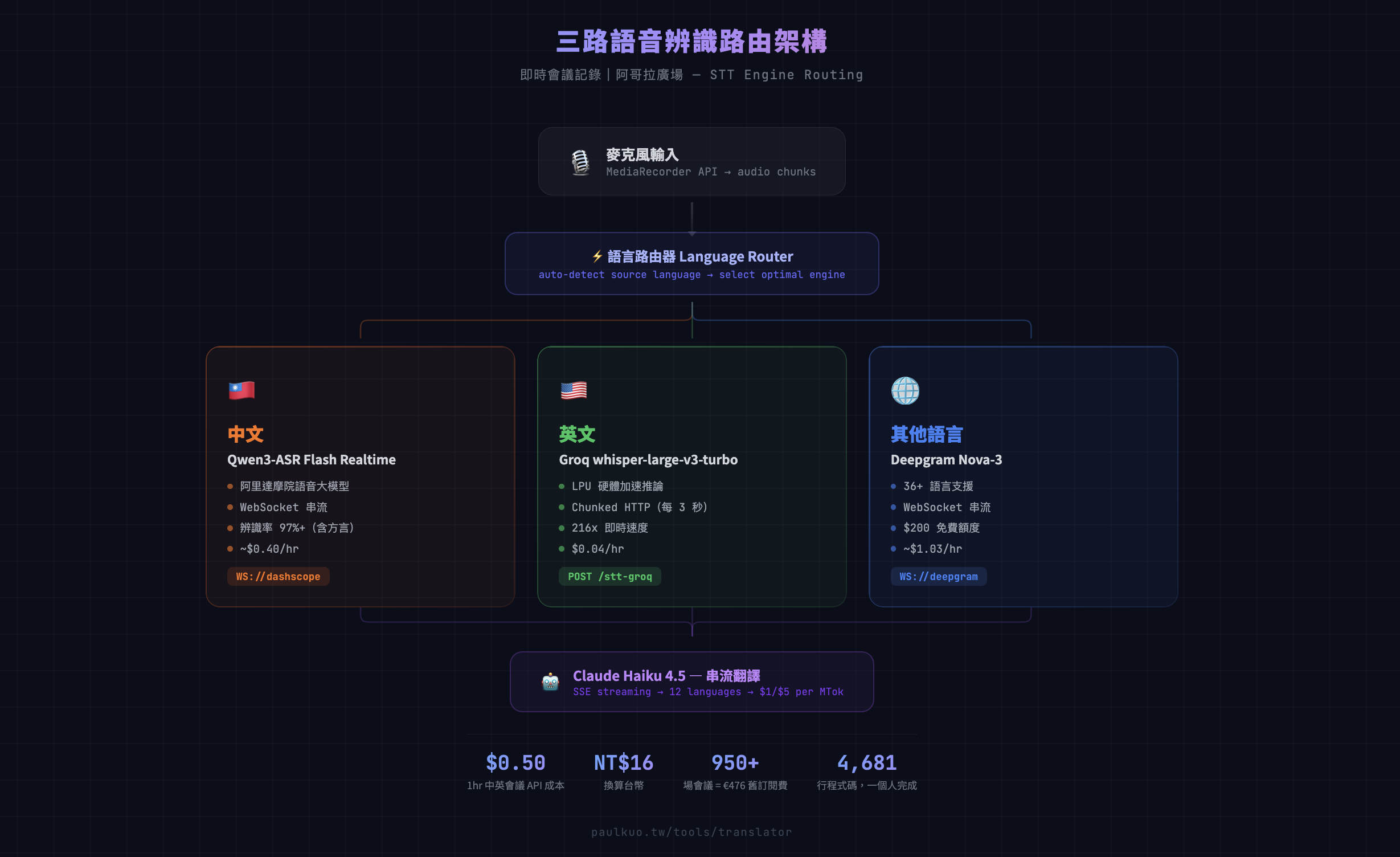
Figure: The speech recognition routing architecture of the self-built approach. Sending different languages through different engines is the key design for driving costs down, and it’s the kind of flexibility an all-in-one service like Transync AI can’t offer.
Transync AI vs. the Self-Built Approach, Laid Out Side by Side
| Item | Transync AI | Self-Built Approach |
|---|---|---|
| Cost | Personal plan $8.99/month (10 hours), overage billed separately | No monthly fee, billed by actual API usage (about NT$16/hour for Chinese-English meetings) |
| Setup difficulty | Low, just download the app and log in | High, requires wiring up speech recognition and translation APIs and deploying a backend |
| Speed to get going | A few minutes | Requires development time (this author spent weeks refining it) |
| Customization | Low, features and flow are decided by the vendor | High, you can pick your own engine, define your own glossary, and customize the interface |
| Privacy and data control | Per the official terms, data is processed through third-party services | High, you decide the data flow and retention policy yourself |
| Best suited for | Individuals or small teams who don’t want to touch tech and need to get going fast | People with basic technical ability or an AI-collaboration workflow, who care about cost transparency and data autonomy |
Is Transync AI Any Good? It Depends on Which User You Are
If you only need cross-language meetings occasionally and use less than 10 hours a month, Transync AI is worth it: low install barrier, full features, and nothing to maintain yourself.
If you’re a long-term heavy user with meeting hours that stay high, take the official add-on hour packs and estimate your monthly cost first, then compare it against the marginal cost of the self-built approach. You’ll usually find the gap wider than you expected.
If you have an engineering background yourself, or you’re willing to break the problem down through AI collaboration (you don’t need to write code, but you do need to state your requirements clearly), the self-built approach is worth serious thought: lower long-term cost, and your data stays in your own hands.
If your meeting content touches company secrets or client data, whichever path you choose, read through the data retention and third-party processing terms first. There’s no shortcut here, and it shouldn’t be left to any review article to verify for you.
Transync AI isn’t bad. It handles the “works out of the box” part very smoothly. It’s just that smooth doesn’t equal worth it, and worth it doesn’t equal right for you. Estimating your real usage once, before you subscribe, tells you more than any review ever will.

💬 Comments
Loading...