TL;DR — After Claude Design shipped its June 17 update, its integration with Claude Code became significantly deeper. This means it no longer just generates polished visuals from prompts — it can now read a site’s actual design system via
design-sync, keeping every subsequent output aligned with the real brand language.This time I connected paulkuo.tw’s brand tokens to Claude Design: 10 files synced, validate exit 0, zero force pushes. But what’s genuinely worth recording are the moments throughout the process that demanded a human judgment call — whether a permission request was safe to approve, whether the AI was reading the right files, whether my own memory was already out of date, and whether the output needed an independent set of eyes before it shipped.
The stronger the tool, the more valuable human judgment becomes.
After the Claude Design update, the first thing I wanted to test wasn’t whether it could generate more beautiful visuals — it was whether it could genuinely connect to my actual website.
So I used design-sync to feed paulkuo.tw’s design system into it. Halfway through the process, I was staring at a permission confirmation dialog in the terminal, fingers hovering over Enter. The access scope it was requesting was larger than the action in front of me warranted: I was just trying to sync a few colors and fonts, but it was asking to touch a subdirectory that seemed entirely unrelated.
In that moment, if I had just reflexively pressed Yes, the process would probably have moved forward — but I wouldn’t have actually known what it was about to do. So I stopped, stepped back, and read what it was asking for. That turned out to be the right call.
I want to use that pause to unpack a more important question behind this Claude Design update: when AI tools become powerful enough to connect a design system to a codebase — and even begin executing entire workflow segments on your behalf — what is it that humans genuinely cannot outsource? My answer is gatekeeping. And gatekeeping is far harder than writing prompts.
Design ↔ Code Is Now Bridged — What Does That Mean for People with a Codebase?
When you used AI for design in the past, the output was usually polished enough — the real problem was that it tended to look like “beautiful in a way anyone could have made it.” Claude Design could already generate mockups and components, but it didn’t recognize your website. It had no idea which colors, typefaces, spacing values, or component logic you actually used, so the output often carried a kind of generic AI design feel: not bad, but not you. This is exactly where the update becomes genuinely interesting: Claude Design can now connect to a codebase through Claude Code and read your actual design environment.
For me, the significance of the June 17 update wasn’t simply that a new feature appeared — it was that the boundary between Claude Design and Claude Code began to dissolve. The most important change is a rebuilt design system import: Claude Design no longer just listens to you describe your brand — it can read a GitHub repo, a design file, or raw source data, use your real design system as the basis for generation, and even compare its own output against that source, detecting mismatches and correcting them automatically.
For anyone with their own codebase, this is a watershed moment. Previously, what my website looked like — its colors, its typefaces — and what AI generated for me existed in essentially separate worlds. Now I can connect those two worlds with a single command.
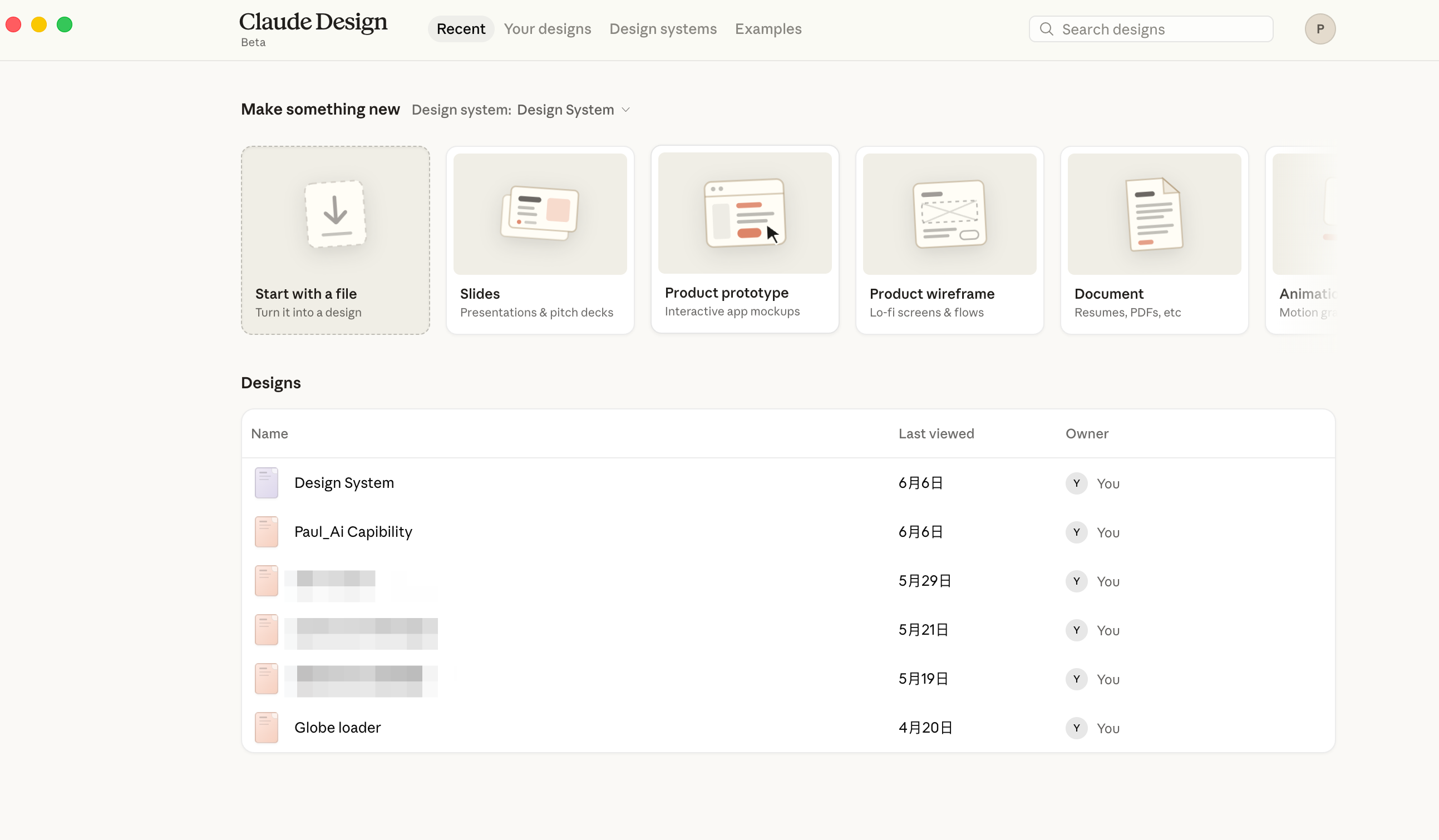
The screenshot above shows what Claude Design looks like now. Beta is still showing in the upper left, but all the essential entry points are present: start from a file, build a presentation, build a product prototype, build a wireframe — and below that, the design projects you’ve accumulated over time. What I set out to do here was ensure that everything in that list would look like paulkuo.tw from the very beginning.
One thing worth noting: Claude Design usage is metered separately. It has its own weekly allowance, tracked independently from your chat and Claude Code usage — they don’t draw from the same pool. So design usage won’t silently consume your conversation or Code quota. I’m on the Max plan, and this sync didn’t run into any quota issues.
The numbers from this sync aren’t large, but they represent something significant: AI is no longer guessing at my site’s visual style from prompts alone — it’s beginning to read the actual design specifications.
📊 Sync by the numbers
- Files synced: 10
- Scope: Brand tokens (colors, typefaces, spacing)
- Validation result: validate exit 0 (zero errors)
- Version control: commit + push to three mirrors, fast-forward, zero force
- Future cost: A
.design-sync/config file is now in place — subsequent re-syncs take a single command
First, Separate the Layers: The Desktop App Is the Door, Claude Code Is the Engine, Claude Design Is Where You Work
A brief clarification is needed here. Many people hear “Claude Design integrates with the desktop app” and assume it’s a single, simple thing — but this connection has two distinct layers, and conflating them causes confusion.
The first layer is the entry-point integration. Claude Design now has a shortcut in the Claude desktop app’s sidebar; one click takes you directly to the workspace without opening a separate browser tab. This layer is purely about access — the app brings Claude Design inside, making it a directly reachable destination.
The second layer is what actually matters: capability integration. The bidirectional bridge — feeding an existing codebase in, then routing a finished design back to development — is powered by Claude Code, not the desktop app itself. And within the desktop app, there are three modes: Chat, Code, and Cowork. Chat cannot drive this sync workflow. Cowork functions more like a second pair of eyes for knowledge work — well-suited for independent verification, which is exactly how I used it, as you’ll see in a moment. The mode that can actually feed a design system into a codebase and close the loop back to development is Claude Code.
| Role | Responsibility |
|---|---|
| Claude desktop app | The entry point to Claude Design; gets you directly into the workspace |
| Claude Code | The engine that actually drives the “feed codebase ↔ route back to development” loop |
| Claude Design | The workspace where designs are generated and prototypes are built |
In short: the desktop app is the door, Claude Code is the engine, Claude Design is where the work happens. Everything you’re about to read about the sync was done by Code running in the background — not Chat, and not Cowork.
Workflow Overview: Five Phases, Two Critical Decisions
I’ve mapped the entire path I walked through into a single diagram. The focus isn’t on how elegant the steps look — it’s on the judgment call embedded in each one.
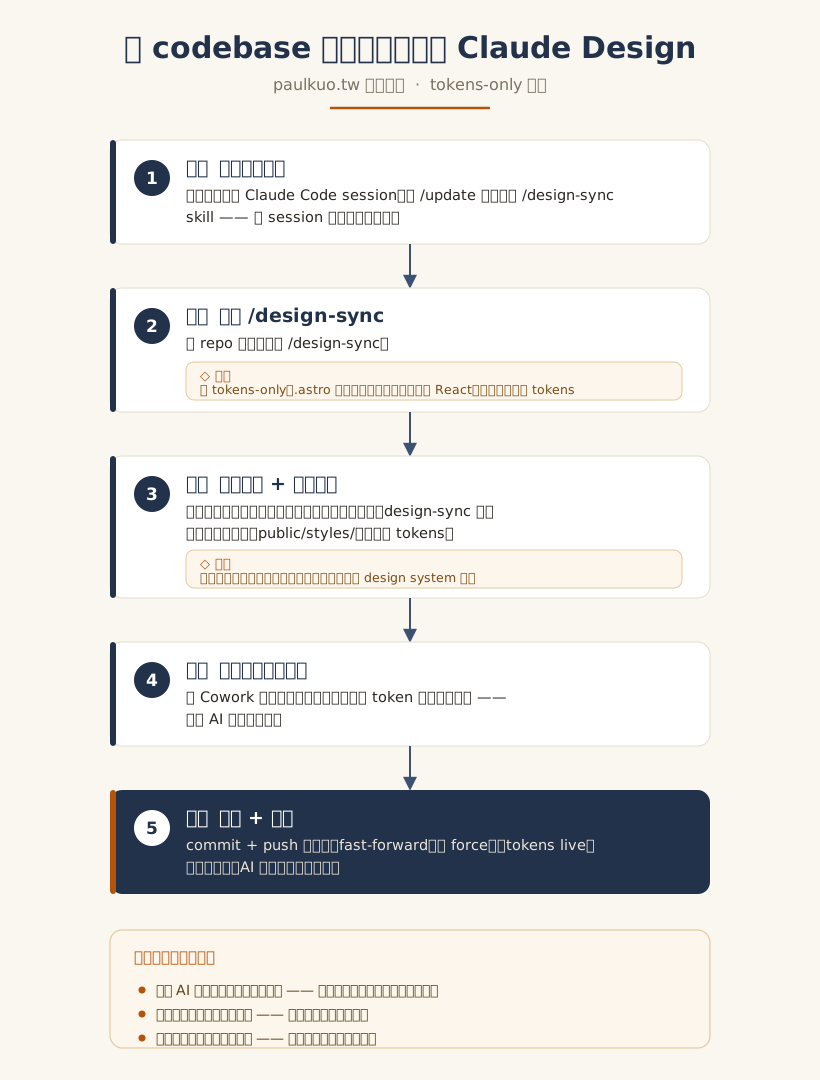
The full workflow goes roughly like this: open a fresh Claude Code session, run /update to pull the latest instructions, launch /design-sync from the repo root, evaluate each permission request individually, verify with independent eyes, then close out cleanly. It sounds like a routine procedure, but the two decisions that demanded real cognitive effort were: first, how deeply to sync; and second, which permissions were safe to approve.
Why Only Tokens? Because the Tool Isn’t Ready to Digest Astro Components
When design-sync runs, it asks what you want to sync. I chose tokens-only — meaning I moved only the foundational brand specifications, not full components. In plain terms: let the AI learn my colors, typefaces, and spacing first, rather than rushing it into understanding my entire Astro component architecture.
This wasn’t caution for its own sake — it was reading the tool’s actual boundaries clearly. Claude Design’s design system import is built to ingest codebases and design files, but in my testing with paulkuo.tw’s Astro project, it currently cannot process .astro components. Forcing it to sync components would likely produce something half-correct at best; rather than accepting that, it made more sense to move only the cleanest, least error-prone layer: colors, typefaces, spacing. These are the foundational layer of a brand. Once they’re in place, any design AI generates for me will at minimum use the right palette and typography.
The second decision was about destination: where should the tokens sync to? The default was to merge them into an existing parent design system, but I chose to create a brand-new project instead. The reasoning was simple: I didn’t want tokens specific to paulkuo.tw bleeding into a shared design system I might reuse for other things later. Whether a single action will contaminate something you’ll need again down the road is exactly the kind of question a tool won’t think through for you — that’s a human call.
When AI Asks You to Press Yes, First Ask What It’s About to Touch
Back to that permission dialog at the beginning. When collaborating with AI agents, you’ll encounter permission confirmations constantly. Most people become numb to them after a while — a dialog appears, they press Yes out of habit. This is the most dangerous habit you can form. My practice is to treat each confirmation as a small test, asking myself two things: what does it want to touch, and how large is the blast radius if I approve?
Shell commands have a basic grammar. You don’t need to be able to write code, but you should at minimum be able to distinguish one thing: is this only reading data, or is it about to modify files? Commands like grep and sed generally lean toward reading or processing text, but the moment you see a > redirect, you should recognize that the output might be written into a file. Being able to tell “looking” from “changing” is enough to avoid a large category of unnecessary risk. Actions sandboxed inside the tool’s own environment are usually safe to allow; but the moment something touches your actual code directory, or an option appears offering to “never ask again,” it’s time to pay close attention.
The dialog that made me stop is the clearest example. It kept appearing, asking me to authorize access to a worker subdirectory — a location with no connection to the token sync I was performing. I eventually figured out that the current working directory happened to be inside that subdirectory, so the tool had used that path as its default scope. When the scope of what’s being authorized doesn’t map onto the action in front of you, that’s your signal to brake. It wasn’t acting in bad faith — its default logic simply doesn’t automatically conform to your intent. That’s exactly when you need to step in and correct it.
Don’t Trust Your Memory — Trust What the File Says Right Now
There was a small incident in the middle of the process that I rather appreciated. design-sync needed to locate where my brand tokens were actually defined. I was entirely confident they lived in src/ — that’s where the source code lives, after all. But the tool did its own cross-referencing and found the real source in public/styles/. I had remembered wrong.
What I find interesting is the inversion here: it didn’t follow my confident assertion and start digging through src/. It actually verified against the filesystem and found the correct location. This runs counter to a common assumption about AI — that it hallucinates, that it flatters you and tells you what you want to hear. In this instance at least, it wasn’t swayed by my certainty; it went back to the files themselves.
But this also surfaced a broader reminder: the fact that AI verifies doesn’t mean it’s always right. Like a person, it carries its own “remembered version” of things. For anything that matters, verify against the live file in the moment — don’t rely on anyone’s recollection, including your own. On this run, my own memory misled me once. Fortunately, the process had a verification step that caught it.
Memory distortion appeared again at the end. When it was time to close out, I had assumed git push would trigger an automatic rebuild on the server — the way most CI/CD pipelines work. But reading the repo’s CLAUDE.md on the spot revealed that the automatic rebuild had been disabled; deployments now follow a different path entirely. Again, the live file overrode the outdated version in my head. These moments of being corrected shouldn’t be resisted — they should be welcomed. This is exactly how the principle of “trust the live source” protects you from compounding a mistake.
Don’t Let AI Verify Its Own Work — Find an Independent Second Set of Eyes
After the sync completed, validate reported exit 0 and all ten files were accounted for. It looked like success. But “the tool says it succeeded” and “it’s actually correct” are two different things.
Rather than letting the Claude Code session that ran the sync verify its own output, I opened Cowork separately and treated it as a second set of eyes that had no involvement in the preceding process. I had it compare the original tokens source against the synced output line by line: were the color values transcribed accurately, was anything missing? Only after confirming everything matched did I commit and push to all three mirrors — cleanly aligned, fast-forward, zero force.
This step is the most important discipline from the entire process: allowing the executor to verify its own work is equivalent to no verification at all. Anything intended for public use — whether code, design, or writing — deserves a review by a role that had no part in creating it, before it ships.
This is also why I’ve long advocated for multi-model cognitive collaboration. The point isn’t to open multiple windows for the sake of it — it’s to have different roles interrogate and cross-check each other. The human stays in the middle, responsible for defining the standard, assessing the risk, and confirming the final result.
There was also a minor scare mid-process. The terminal appeared to freeze and I assumed the connection had dropped — then I realized I’d accidentally pressed Ctrl+Z, which had simply suspended the tool to the background. Typing fg brought the entire process back. Another reminder: much of the panic we feel in these situations comes from not knowing what’s happening at the layer beneath.
The Stronger the Tool, the More Valuable the Judgment
To compress this entire experience into a single sentence: working with AI, the real skill isn’t knowing how to write prompts — it’s being able to see what the tool is about to touch, being willing to verify against the live source in the moment, and knowing when to bring in someone else to check.
design-sync is genuinely powerful. One command connected my site’s brand to AI, so that every design it generates going forward will automatically be on-brand. But what made this process correct rather than merely completed — from start to finish — were all the judgment calls that never appeared in any command. This connects to what I’ve been writing about regarding taste and judgment: when the cost of execution is compressed toward zero, the only meaningful differentiator left is the quality of the decisions.
This Claude Design update is only the beginning. More AI tools are coming that won’t just generate content — they’ll connect directly to your working environment, read your files, and modify your processes. The number of things that can be accomplished with a single click will keep growing. But for precisely that reason, the person who is willing to pause for half a second before pressing the button — to step back and take one more look — will become increasingly rare, and increasingly valuable.
Next time a confirmation dialog appears, don’t rush to press Yes. Ask first: what exactly are you about to touch?

💬 Comments
Loading...