
TL;DR — Efficiency doesn’t come from the most powerful model; it comes from clear division of labor. I let three Claude interfaces each fill their role: Claude Design handles visual ideation, the web version of Claude handles logical critique, and the desktop version of Claude handles code implementation. They communicate through three types of files — mockups, spec documents, and real screenshots — which serve as their shared contracts. This isn’t a one-way pipeline; it’s a loop: the real, live rendering feeds back to correct the original design.
Whenever I’m designing a new layout, my workflow sounds inefficient by most standards: I pass the same work through three different Claude interfaces, several times each. I start by having Claude Design produce the visuals; then I hand it to the web version of Claude to interrogate whether it actually makes sense; next I pass it to the desktop version of Claude to write it into code and deploy it live; and finally, I take a screenshot of the real, live page and send it back to Claude Design to see what needs refining.
It sounds like a roundabout path. But the longer I work this way, the more convinced I am: the roundabout nature is precisely the source of its power.
Most people’s instinct when using AI is to find one sufficiently powerful, all-capable tool and hand everything to it. AI companies are happy to sell that fantasy: one input box, and your idea becomes a finished product. My experience runs in exactly the opposite direction. No single interface can walk this entire road on its own — push it to cover everything, and every step comes out half-finished. The key has never been finding the perfect AI. It’s seeing clearly where each interface’s capabilities end, then letting each one operate in the domain where it excels.
Three Claudes: The Explorer, the Critic, and the Builder
These three interfaces have fundamentally different capability profiles. No hardware upgrade changes the behavioral differences that emerge from interface design.
Claude Design is the Explorer. It excels at letting visuals emerge: rapidly generating page mockups (HTML mocks), rendering components, even helping you articulate design context into a structural framework. Since the June update moved it into the desktop app, it can read your existing codebase directly — which means the designs it generates conform to your actual site’s style rather than producing a polished-looking image that can’t be used. Ask it to handle complex data integrations or interaction states, though, and it starts to struggle. What it delivers is a visual mockup.
The web version of Claude — claude.ai — is the Critic. It doesn’t produce visuals, but it is exceptionally skilled at design critique: relentlessly questioning “why design it this way? Is there a better tradeoff here?” and translating vague design language into spec documentation that engineers can act on. If you ask it to write code or draw diagrams, you’ve come to the wrong place. What it delivers is a spec.
The desktop version, Claude Code, is the Builder — the hands-on execution end, which is the Code workflow I described in the earlier article Feeding Your Website’s Design System into AI. It reads and writes project files, modifies web components, runs tests, and deploys to production — turning ideas into actual code. Visual sensibility and ideation are not its strengths. What it delivers is working code, and the real, live rendering after deployment.
I’ve mapped out the capability boundaries of all three, and how work flows between them, in the diagram below.
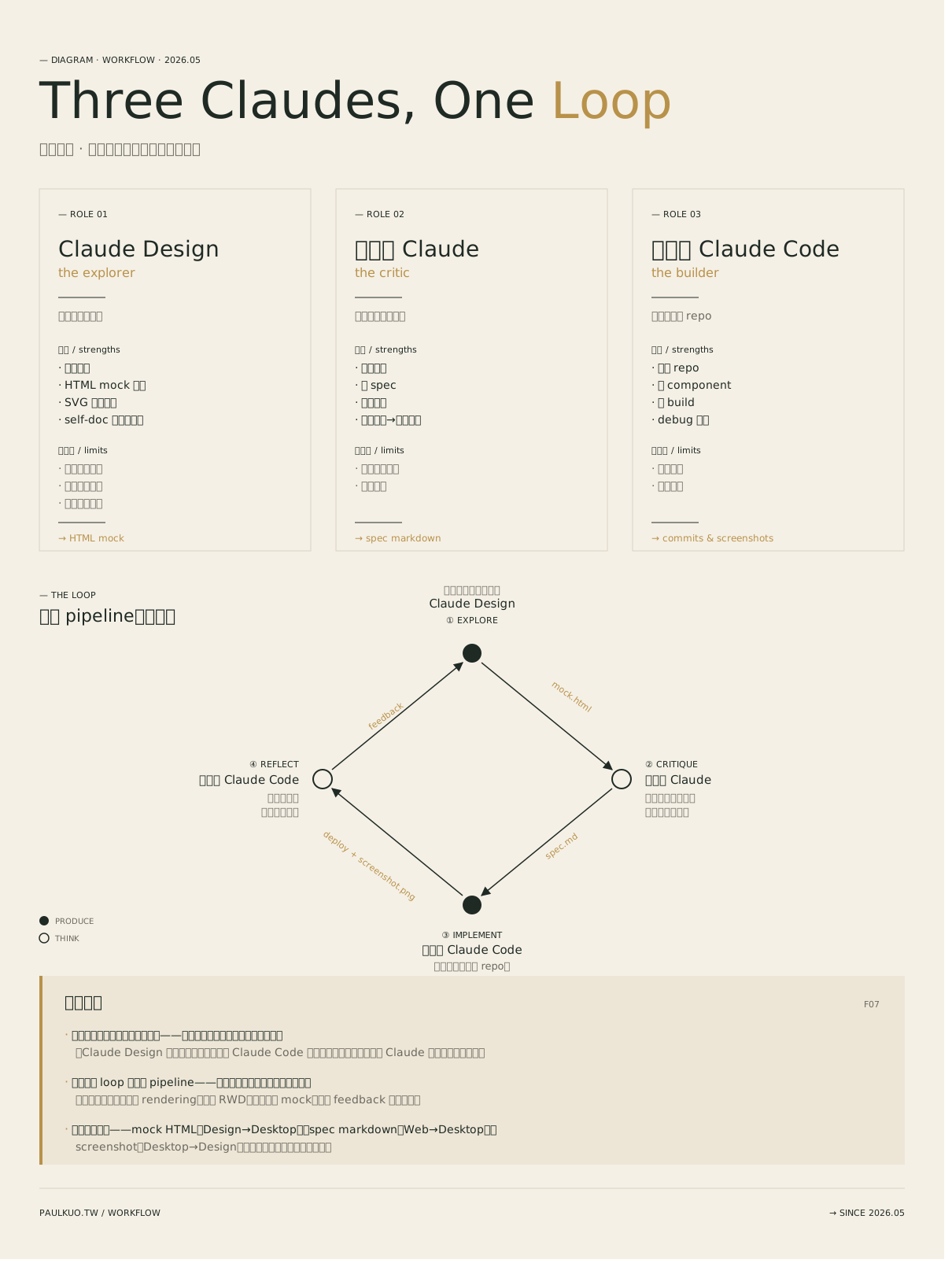
Laid out side by side, the division of labor becomes self-evident: one imagines, one finds fault, one ships. They are not substitutes for one another — they are complements.
Three Files: The Communication Protocol Between AIs
If three interfaces are each operating in their own domain, how do they connect seamlessly? The answer is three very concrete file types. Claude Design hands its visuals to the Builder via a mock HTML file; the web Claude passes its judgments to the Builder via a spec markdown file; the Builder returns results to the Explorer via a post-deployment screenshot. Summarized simply:
| Handoff Direction | Handoff File | Core Function |
|---|---|---|
| Claude Design → Desktop | mock HTML | Defines visual appearance |
| Web Claude → Desktop | spec markdown | Defines logic and implementation rules |
| Desktop → Claude Design | screenshot | Feeds back the real, live result |
These three files are the contracts between the three interfaces. When the inputs and outputs are tightly scoped, the next AI in the chain knows exactly what it needs to do.
This workflow doesn’t fall apart — not because the AIs are especially clever, but because the boundaries and contracts are sufficiently clear. Human teams work the same way: collaboration breaks down not from lack of ability, but from ambiguous handoffs. AIs have no equivalent of human intuition or unspoken understanding. The precision of the interface you give them is exactly proportional to the smoothness of their collaboration.
It’s worth noting that in the past, these files required manual copy-paste by a human. The core of the June 2026 update was eliminating those seams. Through built-in automatic sync (design-sync), the transition between “exploration” and “implementation” has become increasingly effortless. The loop structure of the system hasn’t changed — what’s changed is that the friction between the gears has been reduced.
Why You Need a Loop, Not a Pipeline
The easiest mistake people make is treating this process as a one-way pipeline: design, evaluate, write code, ship. But the real world has a way of making a mockery of design.
A layout that looks perfect in a mockup will frequently break the moment it’s filled with real user data, subjected to a browser’s font rendering, or viewed at a different screen size (RWD).
That’s why deploying code is not the finish line. I always feed a screenshot of the live page back into Claude Design. This is the reflect step — grounding the next round of refinements in “what it actually looks like” rather than “what I imagined it would look like.”
This is the essential difference between a pipeline and a loop: a pipeline assumes you’ll get it right the first time; a loop assumes you won’t. Since errors are inevitable, better to build a sanctioned path for correction directly into the system — so that real results automatically cycle back to the starting point.
Get the Starting Point Right, or Everything After Is Wasted
The design-sync workflow I discussed earlier is, at its core, the “starting-point calibration” for this loop.
When you feed your site’s design tokens — brand colors, typeface spacing, and similar rules — into Claude Design, what are you actually doing? You’re teaching the Explorer to recognize your home. The very first mark it draws will carry your site’s genetic code, rather than that cheap, generic AI aesthetic.
Get the starting point right, and every subsequent pass through the loop has quality. Start crooked, and you’re only accelerating in circles. This is also the core insight in multi-model cognitive collaboration: the point isn’t how intelligent any single AI is — it’s how to build an ordered structure in which they cover for one another.
Always Keep the Human at the Center of the Loop
Having walked through this automated closed loop, you’ll notice something interesting: all three Claudes are remarkably powerful, yet not one of them knows where this ship is supposed to be heading.
Which direction should we correct toward? Which feature tradeoff actually serves the business? When is it time to stop? These value-laden decisions are beyond the reach of AI — and AI does not make them well.
The tools handle executing each step at speed. The human decides the direction. Three AIs run through a loop, but the one who gives that loop its meaning is always the person sitting at the center, defining the order.

💬 Comments
Loading...