
Say you’re planning a cycling trip in Hokkaido, from Sapporo to Otaru to Yoichi. You’ve pulled up a map, read a few trip reports, and checked the weather. But a handful of things still aren’t settled: how long is this stretch in total? Where does most of the climbing happen? How long will it actually take? Which parts still need a second look?
Overseas marathons bring a similar kind of scatter. Race information, bib pickup notices, and transport arrangements are spread across different pages, and after reading through all of it, you still have to turn it into your own itinerary.
I built Field Brief to give all of that information one place to live together. You can organize locations, dates, routes, and weather into a single pre-trip briefing, keep track of your sources, and note what still needs confirming.
👉 Open the Outdoor Trip Prep Tool
What Field Brief Helps You Organize
The purpose is concrete: before you leave, see clearly what you actually have.
If you have a route file, load it and view the GPX-calculated distance. If the GPX includes elevations, you can view its elevation profile. Estimated ascent appears only when an elevation lookup returns complete, valid data. Set your location, trip dates, and departure time, then query the tool’s weather data to see which dates and time windows the forecast covers.
You can also add a checklist of things that still need sorting, such as resupply points, transport, gear, anything open. When you’re done, download the result as an image or PDF to keep on your phone or share with whoever’s coming with you.
Here’s one of the finished examples already on the site:
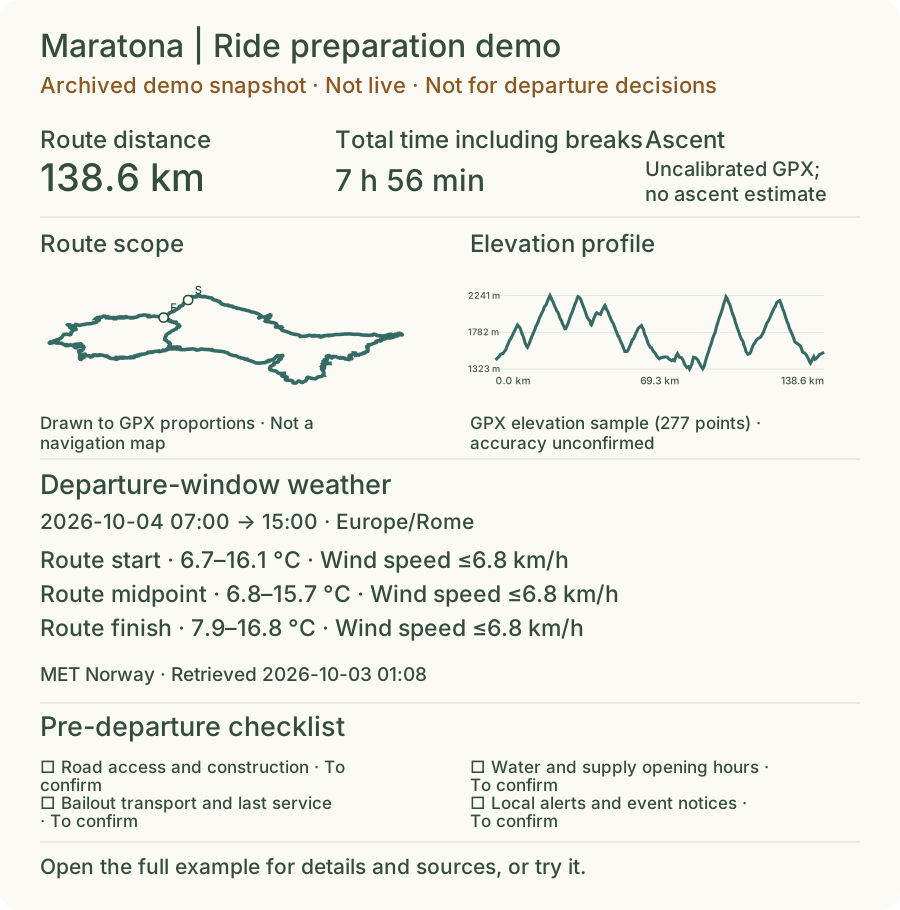
A Maratona cycling example. The weather shown is a fixed snapshot; when preparing your own trip, you’ll need to query fresh data.
No GPX? You Can Still Start
GPX is a common route file format that stores coordinates along a path; some files also include elevation. If you don’t have a route file yet, you can search for locations, drop a few points on the map, and sketch the general shape of your trip. This is a useful way to work out “which places am I passing through” before you have anything more precise.
The lines drawn this way are straight-line sketches between points. Distances are straight-line estimates; the tool doesn’t route along roads automatically.
For something like “Sapporo → Otaru → Yoichi,” you could place the cities to establish the rough scope of the trip, then import a GPX file whose source and version match your trip, and review the geometry and distance recorded in that file.
The distinction is preserved in the briefing so you can tell at a glance where each number came from.
Where to Start If It’s Your First Time
No login needed. Open the site and hit “See a completed example” first to see what a finished briefing looks like, then choose “Try my own trip” to begin your own.
Your own trip follows four steps:
- Fill in the basics. Give the trip a name and write down what you want to confirm, such as weather, climbing, estimated riding time, whatever’s on your mind.
- Set location and dates. Enter your location, trip dates, and time zone, then either draw a sketch or import a GPX file.
- Check weather and open items. Query the available forecast, review what dates it covers, and add your own questions.
- Preview and download. Once everything looks right, download the mobile summary image or portrait PDF.
You can go back and revise at any point. Anything you don’t have yet can stay marked as an open item while you keep building the rest.
Three Race Examples for Runners from Taiwan
The site also includes pre-trip briefing examples for the Nara Marathon, Standard Chartered Hong Kong Marathon, and Ishigaki Island Marathon.
From the homepage, look for the “Three races for runners traveling from Taiwan” section to see the organized race information, source links, and open items. From there, you can hit “Edit my trip” and swap in your own arrangements.
These examples give you a starting point for your own organizing. As you read through them, keep checking the organizers’ latest announcements, especially for bib pickup details, start-wave assignments, and transport.
If race day is still far off, the tool won’t treat current weather as a race-day forecast. You can organize your itinerary now and come back to query weather once you’re close enough for the dates to fall within the forecast window.
I Wanted First-Time Visitors to Understand Immediately
One thing I kept coming back to while building this: can someone who’s never seen the site figure out what it does and where to begin?
So the homepage leads with a finished example, and the “Try my own trip” form appears early. Text and buttons are larger on mobile. Missing fields get flagged directly rather than vaguely. The tool asks for confirmation before clearing a draft.
My intention is that you see what a finished result looks like before deciding what to fill in.
That’s similar to what drove me when I built the LINE note-taking bot: turning scattered information into something you can find and use later. This time, the output needs to travel outside with you and make sense to whoever you’re with.
Leave Your Open Questions on Record Before You Go
Field Brief is currently a public beta. It helps with organizing information and flagging sources. Whether a road is open, whether a race course has changed, and whether conditions are right for departure still require confirmation from the relevant authorities. Overseas forecasts do not include local alerts, and the absence of a displayed alert does not mean conditions are suitable for departure.
Your full GPX file is processed in the browser and never stored in the site’s database. Searching for locations, loading maps, and querying weather or elevation data does involve requests to external services; usage details for those services are available on the site.
When you’re done, download the result. The site won’t publish your briefing, and the checklist on the current page won’t survive a refresh.
Next time you’re preparing a ride, a hike, or a race abroad, try pulling up one of the examples and reworking it into your own trip.
👉 Use Field Brief to Organize Your Pre-Trip Briefing
This article is also part of the Tools and Implementation section on Paulkuo.tw.

💬 Comments
Loading...